IRCC's physical presence calculator helps you work out when you reach the 1,095 credited days needed to apply for Canadian citizenship. And eligible days before permanent residence may bring that date closer than a count starting only from landing. Your travel history also matters because full days abroad generally reduce the total available within the five-year period. If the records disagree, working out when you can apply can feel frustrating even when the arithmetic seems straightforward. Once you establish your physical-presence position, check the other Canadian citizenship requirements before choosing your application date.
By Narek Mirzoyan, RCIC # R1005184,. Verify this credential on the CICC public register.
Last reviewed by Narek Mirzoyan, RCIC # R1005184, on 2026-09-16.
TL;DR
Physical Presence Calculator for Canadian Citizenship helps you work out when your credited days reach the required 1,095-day total. Your calculation covers the five years before signing, with qualifying pre-PR time counting as half-days, up to 365 days. Travel dates and immigration status determine which days count, so check those records before relying on the result. Follow IRCC's calculation instructions for your online or paper application, then confirm the remaining citizenship requirements.
Table of Contents

Separate the legal rule, your chronology and the calculator output
To work out when you can apply, check which days qualify and whether your records support those dates. The Citizenship Act establishes which periods can contribute to the physical-presence requirement. Your documents establish when you held qualifying status and when you were actually in Canada. The calculator applies the counting rules to the information supplied, rather than investigating that information for you. If a return date is uncertain, establish that date before deciding whether its credit belongs in your total.
The calculator does not authenticate the dates entered
Entering a return date does not establish that you crossed the Canadian border on that date. But a flight booking may show your original itinerary when the journey actually finished the following morning. If you enter the booking date without checking the completed travel, the calculation uses that earlier date. IRCC's calculator guidance directs applicants to passports, banking records, itineraries and receipts when reconstructing trips. When a booking conflicts with completed travel, enter the supported crossing date and keep the records explaining the difference.
An eligible output is not an eligibility guarantee
Reaching the required day total answers the physical-presence question only. Citizenship eligibility also depends on requirements that the calculator does not decide, including permanent resident status and applicable prohibitions. Depending on your age and circumstances, language, tax-filing and knowledge requirements may also apply. Those requirements belong in the broader citizenship eligibility review, even when your calculation comfortably exceeds the minimum. Before signing, confirm which of those remaining requirements apply to you and whether you have the evidence IRCC requests.
The application remains the applicant's declaration
Review the final entries even if someone helps you prepare the calculation. A representative may organize your documents, but tell them about omitted trips and ask them to explain unfamiliar entries. Compare the application with the calculation before signing, particularly the permanent residence date and travel periods. The current application instructions require complete answers across the relevant histories. Keep a copy of what you submit so any later correction can identify the original entry precisely.
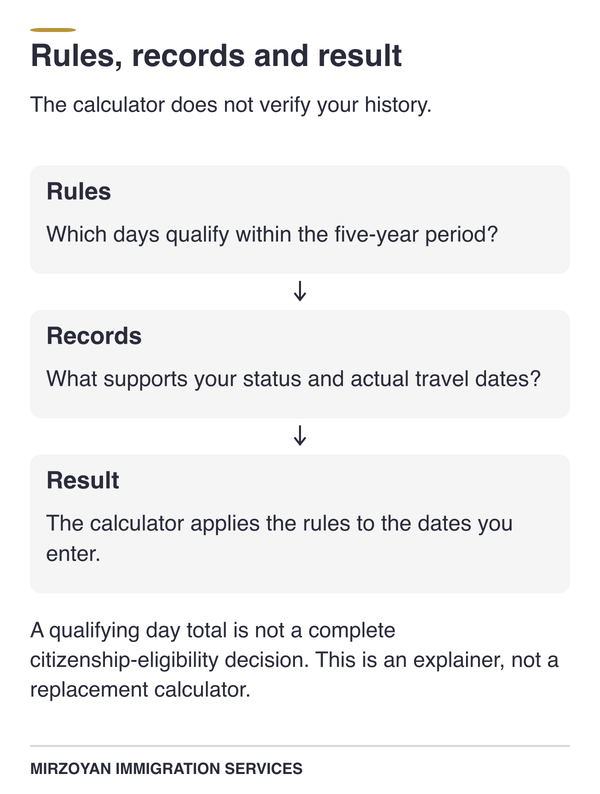
Rules: Which days qualify within the five-year period? Records: What supports your status and actual travel dates? Result: The calculator applies the rules to the dates you enter. A qualifying day total is not a complete citizenship-eligibility decision. This is an explainer, not a replacement calculator.
How the five-year eligibility window moves with the signature date
The calculation uses the five years immediately before the date you sign your application. But the calculation excludes earlier years, even if you lived in Canada throughout them. Moving the signing date changes both ends of that period, so older days can leave the calculation while newer days enter. The signing day itself does not contribute to the total required before applying. Use IRCC's five-year eligibility instructions to plan around an actual date, rather than an approximate anniversary.
The application date anchors the window
Choose the proposed signing date before checking which travel and status records fall within the calculation. For example, signing on September 5, 2026 creates a period from September 5, 2021 through September 4, 2026. This is a calendar illustration, not a finding that someone qualifies on that date. Days before the starting date cannot contribute, even if they were spent lawfully in Canada. If you change the proposed signing date, rerun the calculation instead of keeping the old window.
A saved calculation can become stale before submission
A saved result remains a record of the dates used when it was prepared. Suppose you calculate in August, then take a trip and decide to sign in September. You need to enter the new travel and calculate for the September signing date. Even without another trip, IRCC instructs applicants to recalculate when applying later. So keep the August estimate for planning, then use the September calculation for the application you sign.
Pre-PR credit still requires substantial time after permanent residence
The good news is that qualifying time before permanent residence can bring your citizenship application date closer. Each eligible day contributes half a day, subject to a maximum pre-PR contribution of 365 days. But the remaining credit must come from qualifying time after permanent residence under the ordinary calculation. You therefore need at least 730 credited days after becoming a permanent resident, even with the maximum earlier contribution. The official counting rules explain why two years since landing will not be enough for every applicant.
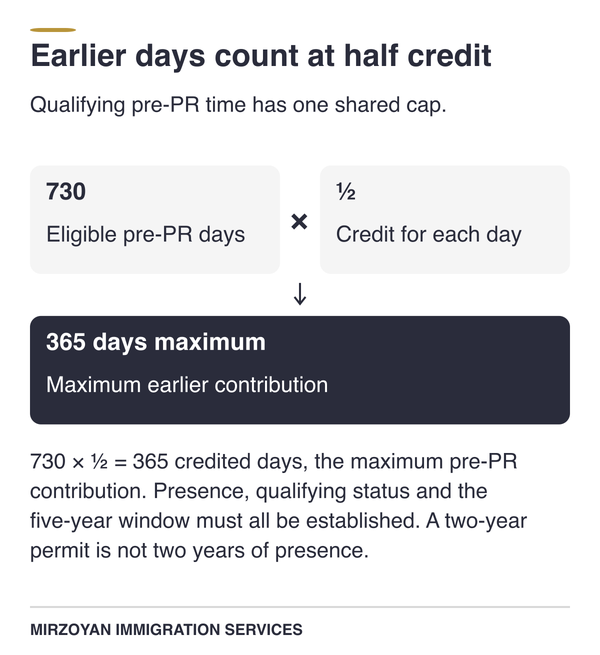
730: Eligible pre-PR days ½: Credit for each day 730 × ½ = 365 credited days, the maximum pre-PR contribution. Presence, qualifying status and the five-year window must all be established. A two-year permit is not two years of presence.
Half-day credit is capped at 365 days
Pre-PR credit depends on both your physical presence and your qualifying status during that time. Eligible periods as a temporary resident or protected person can contribute, but they share one combined 365-day ceiling. So changing from temporary resident to protected person does not give you another 365-day allowance. Time outside the five-year window cannot be brought back into the calculation because it would help reach that ceiling. For each earlier status period, count only eligible days inside the window before applying the half-day rate.
Maximum pre-PR credit takes 730 eligible calendar days
You need 730 eligible days in Canada before permanent residence to receive the full 365-day contribution. But a two-year permit does not establish that you spent every one of those days in Canada. Trips abroad reduce the available presence, and part of the permit period may fall outside your eligibility window. The examples below apply the half-day rule and shared cap after those exclusions have been addressed. For your own count, use the days you can establish through both travel records and immigration documents.
| Period within the five-year window | Days in Canada | Credit | What to check |
|---|---|---|---|
| Before PR, with qualifying temporary resident or protected person status | 600 eligible days | 300 days | Remove absences and confirm the status dates. |
| Before PR, with qualifying status | 730 eligible days | 365 days | This reaches the maximum pre-PR contribution. |
| Before PR, with qualifying status | 900 eligible days | 365 days | Additional pre-PR days do not increase the cap. |
| After becoming a permanent resident | 795 eligible days | 795 days | Count actual qualifying presence, not elapsed time since landing. |
Time spent serving a sentence can also affect which days contribute to the calculation. Generally, imprisonment, parole and probation periods cannot be counted, even when you were physically in Canada. IRCC identifies specific exceptions, including certain successfully completed youth sentences and probation associated with a successfully completed conditional discharge. Check the actual court documents before deciding whether an exception applies. The treatment of those periods can also raise separate citizenship eligibility questions requiring advice beyond the arithmetic.
At least 730 credited days must still follow PR
The minimum post-PR contribution increases when you have less than the maximum pre-PR credit. For example, 600 qualifying days before permanent residence contribute 300 days toward the total. You would then need 795 qualifying days after permanent residence to reach 1,095. That arithmetic assumes every included day falls within the eligibility period and that absences and other exclusions have already been removed. Calculate from your own records to see whether earlier qualifying time lets you apply sooner than counting from permanent residence alone.
Travel-day conventions that change the answer
IRCC counts the day you leave Canada and the day you return as days of physical presence. Only the full days outside Canada are deducted as absences under this travel convention. That means a trip can belong in your travel history without reducing your total. You must still enter its actual departure and return dates. The calculator's absence rules explain why a personal count may differ from the official result.
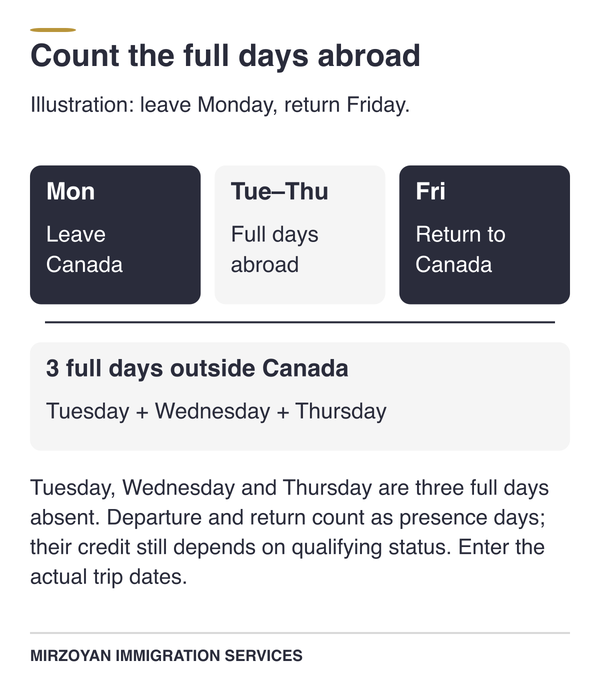
Mon: Leave Canada Tue: Abroad Wed: Abroad Thu: Abroad Fri: Return Tuesday, Wednesday and Thursday are three full days absent. Departure and return count as presence days; their credit still depends on qualifying status. Enter the actual trip dates.
Departure and return days count as days in Canada
A Monday departure followed by a Friday return normally creates three full days outside Canada. Those absent days are Tuesday, Wednesday and Thursday. Monday and Friday remain presence days because part of each day was spent in Canada. But their eventual credit depends on whether they belong to a qualifying pre-PR or post-PR period. Enter the real travel dates and let the calculator apply the convention, rather than shortening the trip yourself.
| Travel pattern | Full days absent | How to enter it |
|---|---|---|
| Leave Monday and return Friday | 3 | Enter the actual Monday departure and Friday return. |
| Leave and return on the same day | 0 | Declare the trip despite the zero-day deduction. |
| Leave Monday and return Tuesday | 0 | Declare both dates; neither is a full day outside Canada. |
| Remain abroad throughout February 29 | 1 for that date | Include the leap day within the actual trip dates. |
Same-day trips still belong in the travel history
A same-day shopping trip across the border must still be declared. The same applies to a work trip that ends with a return to Canada that evening. IRCC requires all absences to be listed, including trips with no full day outside the country. And keeping those crossings in the history helps explain border records showing a departure without a full day abroad. Record each trip when it happens so frequent short crossings do not become a reconstruction exercise before filing.
Overlapping absences create input errors
Two trip entries should not describe you as outside Canada twice during the same period. An overseas journey involving several countries can create this problem if each destination becomes a separate, overlapping Canadian departure. Check when you actually left Canada and when you actually returned. Enter the destinations and reasons in accordance with the calculator's prompts, without inventing a return between foreign stops. If an overlap warning appears, correct the underlying dates before trying to change the final total.
Reconstructing a travel history when records disagree
If a passport stamp and flight itinerary show different dates, settle the return date before relying on your day total. IRCC recommends checking several kinds of records, because no single document necessarily describes the complete journey. Begin with the disputed departure or return, then compare the records closest to that event. A changed itinerary, overnight flight or missing stamp may explain why two dates differ. Keep the explanation beside the corrected entry so you do not have to repeat the investigation later.
Start with a chronology, not with a total
List the trips in date order before adding their effect on physical presence. Include short crossings, work travel and journeys taken before permanent residence within the eligibility period. Compare passport entries with records of completed travel, rather than relying only on an original reservation. A bank transaction can help you identify a trip, but an online purchase does not establish your physical location. Transfer the confirmed dates into the official calculation, retaining your notes for any trip that needed correction.
Record the source for every corrected date
When you change an entry, note which record supports the replacement date. For example, a revised boarding document may explain why the original booking no longer matches your recollection. Keep both records if they explain the change, rather than deleting the earlier version without context. IRCC's travel journal is an optional way to maintain personal records, not an additional document routinely submitted with the application. Keep the working notes separate from the documents the current checklist actually requests.
Explain unresolved discrepancies before filing
If two records still conflict, identify the precise date you cannot establish. Then work out whether that uncertainty changes the day total or the status period being claimed. But even a difference that leaves the total unchanged may need an explanation beside the relevant application entry. Where the disputed dates could determine eligibility, obtain advice before declaring that you meet the requirement. Waiting alone does not correct an inaccurate entry, so resolve the record as well as reconsidering the proposed application date.
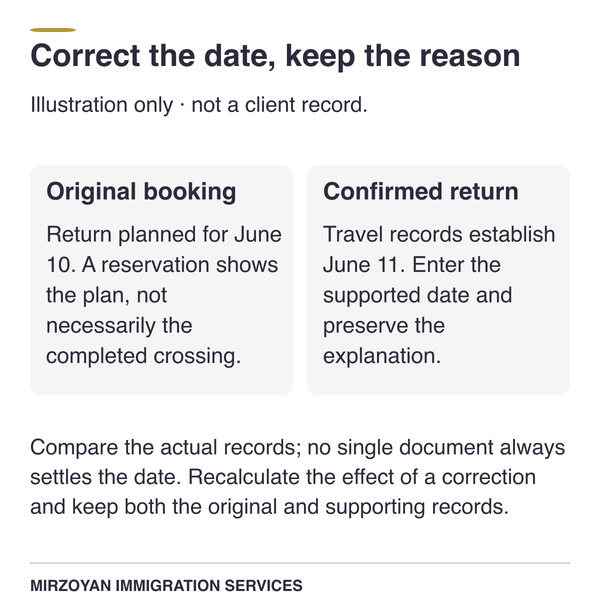
Original booking: Return planned for June 10. A reservation shows the plan, not necessarily the completed crossing. Confirmed return: Travel records establish June 11. Enter the supported date and preserve the explanation. Compare the actual records; no single document always settles the date. Recalculate the effect of a correction and keep both the original and supporting records.
Status-period problems before permanent residence
Before counting days before permanent residence, identify the immigration status you held during each period. Living at a Canadian address or holding a document that permits work does not always establish that basis. You need to identify the status held during the particular dates being claimed. The current citizenship application instructions distinguish temporary resident time from protected-person time and pending refugee claims. Review any transition between those categories before selecting the corresponding dates in the calculator.
Do not count presence that lacks a qualifying status basis
An expired document or a gap between documents needs explanation before you claim the period. Some gaps may involve continuing lawful status, while others may contain time that cannot contribute. But the calculator cannot establish your status from an address or permit number alone. Its status guidance excludes time without the required authorized status. Where an expired permit leaves uncertainty, check whether you retained qualifying status before adding those days.
Protected-person credit begins with the qualifying decision
Protected-person credit begins with the qualifying positive decision, not the date a refugee claim was first submitted. Time spent waiting for that decision does not automatically count toward citizenship. IRCC says work or study permits issued during refugee claims or pre-removal risk assessments (PRRA) did not grant temporary resident status. Those permits therefore do not independently establish temporary resident credit for the assessment period. Check the decision-date instructions before deciding how much earlier time can support your application.
Maintained-status transitions need document reconciliation
A period between permit documents may require a closer look at maintained status. Gather the earlier document, evidence of the extension application's timing, the decision and any relevant travel records. The legal effect depends on the circumstances, so the later permit's issue date does not answer every question about the intervening period. If those documents leave the intervening period unclear, obtain a status assessment before claiming its days. Then enter the supported dates, keeping the explanation available if IRCC asks about the transition.
This page addresses the ordinary citizenship-grant calculation, rather than every residence-related rule in Canadian immigration law. Limited Crown-service provisions can require a separate assessment of time abroad. The permanent resident residency obligation and citizenship-by-descent connection rules also use different legal tests. Neither should be substituted for the calculation explained here.
Do the status dates disagree?
Mirzoyan Immigration Services can compare the status records with your proposed physical-presence calculation.
Discuss Canadian citizenship application services if a date discrepancy affects when you plan to sign.
Choose the calculator route that matches the application channel
Online applicants complete their physical-presence calculation inside the citizenship application account. The public calculator remains useful for an advance check and for preparing a paper application. Paper applicants can complete the CIT 0407 form if they cannot use the calculator or prefer the form. But a calculation prepared for paper does not replace the required online-account calculation. Start with IRCC's current routing page so the calculation you prepare matches the application you intend to submit.
Online applicants use the calculator in their account
You can use the public calculator to plan before starting an online application. When you apply online, however, IRCC requires the calculation available within that account. Review the dates entered there even if you completed an earlier public calculation. A new signing date, corrected trip or changed status entry can produce a different result. Finish the required account calculation rather than assuming an earlier printout replaces that step.
Paper applicants can use the public calculator or CIT 0407
For paper applications, IRCC recommends the public calculator and asks you to include its printed result. The CIT 0407 form is an alternative if you cannot use the calculator or prefer the form. Include the completed calculation required for your chosen method, rather than duplicating both methods without a reason. The current CIT 0002 instructions say the calculation printout or CIT 0407 does not need a separate signature or date. Your application still needs the required signature, and its signing date must match the application date used for the calculation.
A session-specific link is not a reusable entry point
An address copied from the middle of a calculator session may not reopen the same working page later. Use the stable IRCC calculation page to reach the correct starting point. If you saved a public calculation, use the service's retrieval option and review the retrieved information. So confirm that the calculation was saved before relying on a bookmark to retrieve it. Keep your underlying travel and status records available so a technical problem does not force you to reconstruct the history again.
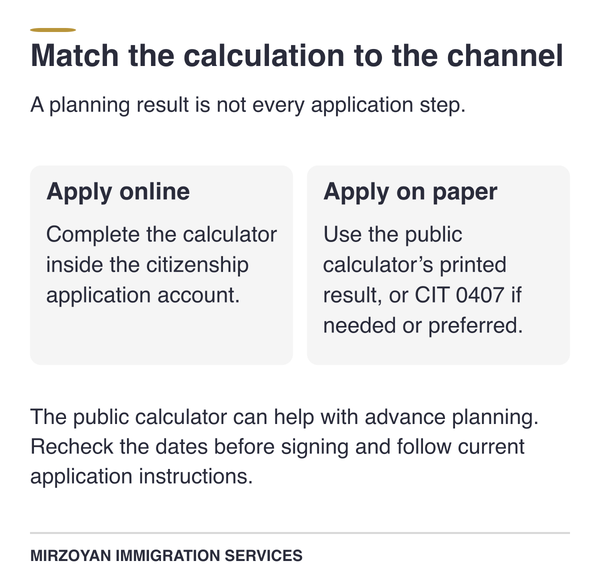
Apply online: Complete the calculator inside the citizenship application account. Apply on paper: Use the public calculator’s printed result, or CIT 0407 if needed or preferred. The public calculator can help with advance planning. Recheck the dates before signing and follow current application instructions.
The Internal Logic of an IRCC Officer
A result above 1,095 days still needs accurate travel and status entries to support the citizenship application. The declared travel, status periods and supporting information need to describe a consistent history. A discrepancy matters when it changes the count or raises a question about the accuracy of the declaration. The statutory requirement remains the same regardless of which permitted calculation method you use. Use the checks below to prepare your application; they do not describe a fixed workflow followed by every officer.
Threshold first, chronology second, consistency throughout
Begin your own review by confirming that the calculation reaches the required total. Next, check whether the dates contributing to that total are supported by the available records. Then compare those dates with the other histories supplied in the application. This is a practical review order for preparation, not a claim about IRCC's internal workflow. If the calculation uses a return date absent from your records, resolve that discrepancy before signing the declaration.
A narrow margin makes an unexplained day more consequential
A small correction can change eligibility when the calculation sits close to the minimum. Suppose an entered total is 1,096 days and a corrected post-PR absence removes two credited days. The revised total would be 1,094, below the required threshold. This arithmetic example shows why IRCC encourages more than the minimum, without prescribing an extra number for everyone. For a disputed return near the threshold, establish the date and rerun the calculation before relying on the extra day.
More documents do not cure a contradictory timeline
A large attachment package can still leave the central date question unanswered. If two records describe different return dates, explain which date is correct and why. Identify the document supporting that explanation instead of expecting the officer to infer it from unrelated material. Submit what the checklist or a specific request requires, with relevant explanations where necessary. A short explanation identifying the disputed return and its supporting document is more useful than unrelated attachments.
What an eligible or projected date does not prove
Use a projected eligibility date to plan your documents, then recalculate before signing the application. It depends on the facts entered and the assumptions used by the calculator. But new travel or a corrected status period can change the date you were planning around. IRCC tells applicants to calculate again when they are ready to apply, even after receiving an earlier projected date. Use the estimate to organize your preparation, then confirm the final count against the actual signing date.
Eligible means the entered arithmetic reaches the threshold
An eligible result tells you that the entered information produces enough credited days. But an omitted trip or incorrectly classified status period can still change whether you qualify. Before relying on the result, review those entries and confirm that the application uses the same dates. You can then move to the remaining eligibility and document checks with a supported physical-presence calculation. Keep the final result with the application records so later questions can be checked against what you actually submitted.
Projected dates change with travel and signature timing
The public calculator's projection assumes your circumstances remain unchanged and you stay in Canada. A planned absence can therefore move the date you were expecting to use. Changes at the older end of the five-year window may also affect the total. After new travel, recalculate rather than adding a guessed number of days to the original projection. And check the projection assumptions again if you expect further travel before signing.
IRCC encourages more than the minimum but gives no universal buffer
You do not need to treat an arbitrary extra month as a legal requirement. IRCC encourages applying with more than 1,095 days to account for possible mistakes, but does not prescribe one universal buffer. The uncertainty in your own records should guide the preparation discussion. But additional days do not correct an unsupported status claim or an inaccurate travel entry. If one unresolved trip could change your eligibility, establish its dates before deciding how much additional time to allow.
Calculator errors and stale-result recovery
If the calculator flags missing information or overlapping trips, check the affected entries against your travel records. Missing fields, invalid dates and overlapping absences can prevent a calculation from completing. Those input problems differ from a session timeout or a result saved for an earlier application date. IRCC's calculator FAQ identifies missing details and overlapping absences as sources of errors. Correct the relevant entry first, then rerun the calculation and review the resulting history.
Fix overlaps before changing the total manually
Check both entries involved when the calculator identifies overlapping travel dates. You may have entered one trip twice or used a foreign arrival date as a return to Canada. Confirm the Canadian departure and return against the records before changing either row. Complete any missing destination or reason fields at the same time. Rerun the calculation after correcting those entries, then check that the trip appears once with the right dates.
Use the stable start page, not an expired wizard URL
Return to IRCC's calculation instructions if an old link no longer reaches a usable screen. A public-calculator session may time out after inactivity and require you to sign in again. Retrieve a saved calculation through the available option, then confirm that the expected entries are present. If printing fails, follow the service's print guidance and check that the complete result is readable before including it. After recovering the result, compare its signing date and trip entries with your saved records before printing.
Recalculate before signing if facts changed
Recalculate whenever new travel, corrected dates or a different signing date changes the information used previously. Compare the replacement result with the version you had planned to submit. Keep only the intended final calculation in the application package, while retaining earlier working copies for your records. If IRCC has already returned your package, follow the specific instructions for a returned citizenship application. Whether you keep or change the application date must reflect those instructions and the facts of the return.
How does IRCC verify physical presence?
IRCC can obtain a CBSA travel history report when it needs one to assess a citizenship application. That information can help check the travel history you declare. It does not remove your responsibility to provide complete and accurate dates. The CBSA citizenship guidance says applicants do not need to request that report themselves for the application. Prepare the required histories and respond to any specific request, rather than delaying solely to obtain an unnecessary report.
Do not request a CBSA report solely for citizenship
CBSA specifically tells citizenship applicants that IRCC can collect their travel history when needed. Consent to share the entry and exit information is no longer required for this purpose. That citizenship-specific instruction differs from older references to a consent question on the application. But you still need your own travel records to prepare the dates declared in the application. If IRCC later asks for a particular travel document, follow that request and its deadline.
Follow the current account or form prompt
Use the instructions accompanying the current application, rather than a screenshot from an older guide. Question numbers and consent wording can change between form versions. The current CIT 0002 instructions should guide a paper applicant completing that form. Online applicants should answer the questions presented in their own account. If two official pages appear inconsistent, identify the specific conflict before deciding what to submit.
Border records do not remove the duty to declare every trip accurately
A border history provides evidence about recorded crossings, not a completed citizenship calculation. It does not classify every pre-PR day or establish the accuracy of every other application entry. CBSA distinguishes individual travel records from highway passage reports, which identify a recorded licence plate rather than its occupants. So a recorded vehicle crossing alone does not establish that you were inside that vehicle. When a record concerns your vehicle, compare it with documents identifying your own departure and return.
Red Flags & Procedural Fairness Letters (PFL)
If IRCC questions your travel dates or pre-PR credit, identify the disputed period before preparing your response. A concern about eligibility or the reliability of a declaration may require a more detailed response. A corrected trip that reduces the total below the threshold is different from a missing document that confirms an unchanged date. Unsupported pre-PR credit or incompatible travel and address histories also need a precise explanation. Use the dedicated guide to citizenship PFLs and information requests when a notice has already arrived.
A request for documents is not automatically a PFL
Read what IRCC is asking and identify whether the letter states a concern you must answer. A routine evidence request may ask for records needed to continue assessment without alleging a credibility problem. A procedural fairness letter calls for a response to the concerns identified in that letter. IRCC can request information or evidence under the Citizenship Act without issuing a PFL. Record the deadline and submission instructions before deciding what documents or explanation to prepare.
Correct the chronology and explain the source of the error
Start with the exact entry IRCC questions and the record that supports the corrected date. Explain how the original entry arose, without inventing a reason that the available evidence cannot support. Recalculate the effect on physical presence and address that effect directly in the response. If the corrected total raises an eligibility concern, a replacement printout alone will not answer the entire issue. Obtain advice on the response and deadline through our Canadian citizenship application services where you need help assessing the consequences.
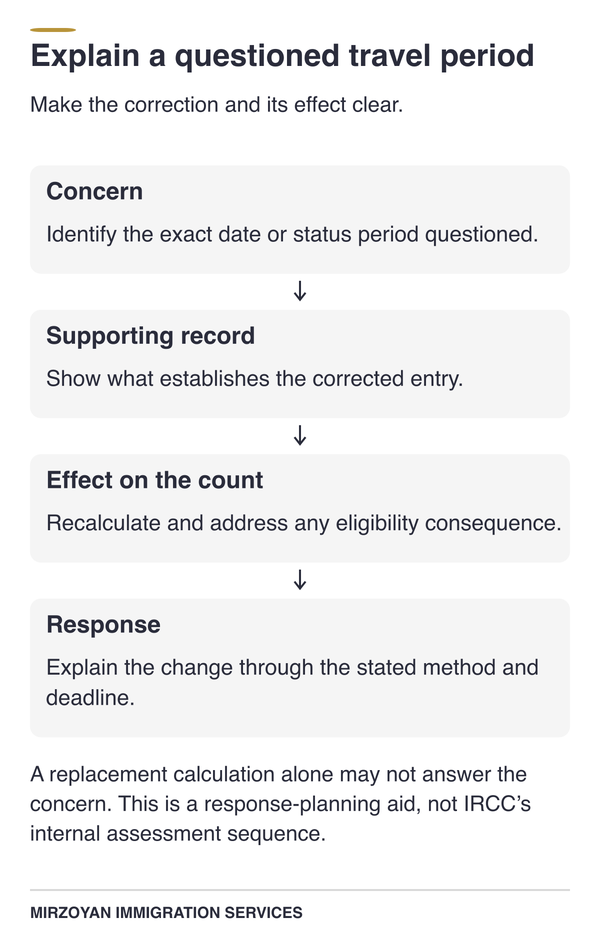
Concern: Identify the exact date or status period questioned. Supporting record: Show what establishes the corrected entry. Effect on the count: Recalculate and address any eligibility consequence. Response: Explain the change through the stated method and deadline. A replacement calculation alone may not answer the concern. This is a response-planning aid, not IRCC’s internal assessment sequence.
Strategic Trade-off Matrix
If you apply online, calculate in your account; for paper, choose the public calculator or CIT 0407. The online account, public calculator and paper form support different stages or channels. None removes the need for accurate dates and a complete application. The comparisons below follow IRCC's calculation routes, with preparation considerations distinguished from government requirements. If the dates remain disputed, resolving them is a preparation decision rather than another calculation tool.
| Option | Permitted use | Main concern | Next step |
|---|---|---|---|
| Calculator inside the citizenship account | Required calculation for an online application | An earlier public-calculator result may use different dates. | Complete and review the account calculation. |
| Public physical presence calculator | Advance planning or a paper application | A saved result can become outdated. | Recalculate for your signing date; include the printout for paper. |
| CIT 0407 calculation form | Paper alternative if you cannot use the calculator or prefer the form | Manual counting and date-entry mistakes. | Check the arithmetic and include the completed form. |
| Verify records and recalculate before submitting | Either channel when dates remain uncertain | Extra waiting does not resolve an incorrect travel history. | Identify the disputed dates, then calculate the updated total. |
| Choice | Application review | Costs and timing | Processing expectations |
|---|---|---|---|
| Online account calculation | IRCC still assesses eligibility and the declared facts. | Prepare the calculation before submitting the paid application. | The tool itself does not promise faster processing. |
| Public calculator with a paper application | The printout supports the application; it does not approve it. | Allow for printing and delivery of the paper package. | A correct printout does not prevent unrelated document requests. |
| CIT 0407 with a paper application | The same physical-presence requirement applies. | Manual preparation may take additional time. | No separate processing entitlement arises from using the form. |
| Resolve uncertain dates before filing | You can support the total you eventually declare. | Filing moves later while the records are checked. | There is no pending application for IRCC to process during that preparation. |
IRCC's calculation instructions explain where each method is used, not a separate appeal or review process. If IRCC returns or refuses an application, the response depends on the decision and its instructions. Application charges also remain separate from choosing how to calculate your days. Check Canadian citizenship fees before paying, particularly if you are correcting or preparing another application. If you change between online and paper preparation, check both the calculation instructions and the fee instructions before submitting.
When a physical-presence review can help
You may be able to complete the calculation yourself when your travel and status records agree and the official instructions are clear. A review can help when conflicting dates change the proposed signing date or the physical-presence total. Mirzoyan Immigration Services can compare the calculation with the travel, address and status records supporting your application.
Identifying which entry is unsupported helps focus the remaining records work before you sign. Through One on One Advisory, Narek Mirzoyan, RCIC # R1005184, answers your citizenship-file questions directly. Your questions go to him rather than intake staff or assistants.
Canadian citizenship application services can include a review of the calculation and the proposed grant application together. That review cannot create qualifying days, substitute for missing evidence or guarantee that IRCC will accept the calculation.
Key Takeaways
Count qualifying days within the five years before signing, rather than relying on the anniversary of becoming a permanent resident.
Eligible pre-PR days can help you apply sooner, but count at half a day each and share a 365-day cap.
Declare every trip, including same-day travel, while allowing the calculator to apply the departure and return-day rules.
Recheck the travel records, status periods and signing date before relying on an eligible result or an earlier projection.
Mirzoyan Immigration Services can help review unresolved dates and status questions as part of preparing a citizenship application.
Frequently Asked Questions
How to calculate physical presence?
Use IRCC's official calculator for the five-year period before your proposed application date. Enter your permanent residence date, qualifying earlier status periods and all relevant absences. The tool applies the credit rules to those entries and reports the resulting total.
Follow the online or paper instructions for the calculation included with your application. Review the dates before relying on the result, because the tool does not verify your records.
What counts as physical presence in Canada?
Under the ordinary grant calculation, qualifying days spent in Canada after permanent residence count as full days. Eligible temporary resident or protected-person days before permanent residence count as half-days, subject to the combined cap. Only days within the five-year eligibility period contribute.
IRCC's rules also address exclusions, including certain periods serving a sentence, with specified exceptions. A Canadian address or a valid permit alone does not establish that every day in the period counts.
What counts as proof of physical presence?
For a Canadian citizenship application, records can help establish the travel and status dates behind your calculation. IRCC identifies passports, banking records, itineraries and receipts as useful when reconstructing travel. Each record has limits, so a reservation or transaction may need to be checked against evidence of completed travel.
Follow the application checklist and any specific evidence request instead of assuming every personal record must be submitted. Keep the supporting travel records available to explain disputed dates.
How do I calculate my days in Canada for citizenship?
Separate eligible time before permanent residence from qualifying time after permanent residence, then account for absences within the five-year window. For example, 600 eligible pre-PR days contribute 300 days. Adding 795 qualifying post-PR days produces the required 1,095-day total in that illustration.
Your own dates may produce a different result, particularly where trips or status changes affect the count. Use the official calculator to apply the rules to your actual history.
How does IRCC count days?
IRCC applies different credit rates before and after permanent residence, then counts qualifying days within the relevant five-year period. For travel, the departure and return dates count as presence because you spent part of each day in Canada. Only full days abroad are deducted under that convention.
You must nevertheless declare all trips, including same-day crossings and work travel. Enter the actual dates without adjusting them yourself to force a particular deduction.
Conclusion
Use your travel records and qualifying status dates to work out when you can meet the physical-presence requirement. While you confirm that date, prepare the remaining documents so avoidable paperwork delays do not hold up your application. If a test will be required, our Canadian citizenship test guide can help you prepare for that later stage.
If disputed dates affect when you can apply, bring the conflicting records and proposed signing date to a consultation. Mirzoyan Immigration Services can review the calculation and proposed application through Canadian citizenship application services.
Disclaimer
This article provides general information about Canadian citizenship physical-presence calculations and is not legal advice. The applicable rules and instructions depend on your circumstances and may change. Consult a licensed professional for advice about your application.